
Message boards : Theory Application : 6+ day task?
Message board moderation
| Author | Message |
|---|---|
|
Send message Joined: 28 Mar 20 Posts: 39 Credit: 223,244 RAC: 1  
|
I have a Theory task (Theory_2922-4905151-252_1) that has now been running for over 6d, 5.5 hr. Latest Windows 10, on an older machine. The BOINC app is "301.00 (vbox64_theory)". BoincTasks shows the task taking around 45% CPU, so it's apparently still going. Another Theory task (same application) that is still in progress shows in the BOINC Manager a total elapsed/remaining runtime of about 3.5 hours, which is a pretty huge difference. Is all this expected? Should I be concerned about this 6+ day task? Thanks. doug |
|
Send message Joined: 18 Dec 15 Posts: 1969 Credit: 159,390,666 RAC: 45,082  
|
Is all this expected? Should I be concerned about this 6+ day task?no, don't be concerned. The lengh of Theory tasks varies to a high extent (recently I had one which ran about 16 days, and also before my machines received rather long tasks at times). With the LHC tasks, the progess and time indications from the BOINC manager don't tell a thing. However, for Theory tasks, you can click on the "Graphics" button in the left hand part of the BOINC Manager, then a Browser window opens, there you click on "logs", and then on "running log" - this shows the progress of the task |
|
Send message Joined: 14 Jan 10 Posts: 1533 Credit: 10,042,485 RAC: 973  |
To add to Erich56's reply: On the first line of that running.log you'll find something like ===> [runRivet] Thu Sep 25 02:13:29 PM UTC 2025 [boinc pp jets 13000 25 - pythia8 8.244 CP2-CR1 100000 282] The forelast number (mostly 100000) is the number of events to be processed. Go to the end of the running log to find how many events are processed so far. Of course at first: Is the task using cpu-cycles? |
 Send message Joined: 15 Jun 08 Posts: 2724 Credit: 300,130,604 RAC: 46,418 |
Some of them run up to 10 days. Locate the runRivet.log in ...\slots\x\shared\ and check it's "last modified" timestamp. If that is older than a day the task most likely got stuck and you should cancel it. If the log gets updated at least every now and then check it's content for the newest "nnn events processed" lines. Tasks usually process 100000 events, so you can estimate the time left. BOINC can't do this as it doesn't know where it can find those numbers. |
|
Send message Joined: 28 Mar 20 Posts: 39 Credit: 223,244 RAC: 1
|
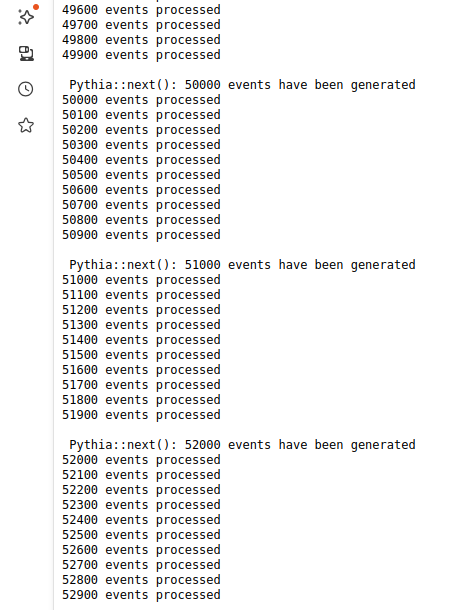
Thanks all. You've set my mind at ease. Following Crystal Pellet's instructions, I found this: ===> [runRivet] Thu Sep 25 01:55:56 PM UTC 2025 [boinc ppbar jets 1960 37 - pythia8 8.230 tune-4c 100000 282] Following Erich56's instructions, I found this: Pythia::next(): 49000 events have been generated 49000 events processed 49100 events processed 49200 events processed 49300 events processed 49400 events processed 49500 events processed 49600 events processed 49700 events processed So apparently only HALF done after well over 6 days! Also, BoincTasks shows the task taking around 45% CPU, so I was pretty sure the task was still alive in some way or other. Finally, the timedate stamp on the file mentioned by computezrmle was updated in the last few minutes. Thanks to all of you! doug |
|
Send message Joined: 14 Jan 10 Posts: 1533 Credit: 10,042,485 RAC: 973 |
Also, BoincTasks shows the task taking around 45% CPU, so I was pretty sure the task was still alive in some way or other.From another Theory task of yours: Run time 5 hours 0 min 11 sec CPU time 2 hours 15 min You should find the reason that your tasks are running < 50% CPU Maybe something in your BOINC settings, if that is not the intention. |
 Magic Quantum Mechanic Magic Quantum Mechanic Send message Joined: 24 Oct 04 Posts: 1291 Credit: 95,277,932 RAC: 30,541
|
I have had many long Valid Theory's over the years but I always watch the running logs since you can get a Sherpa that will run 10 days and fail ( I save stuff) here is one from last June Run time 8 days 18 hours 41 min 28 sec CPU time 8 days 17 hours 14 min 35 sec Validate state Valid Credit 7,539.68 and many others but you can always abort if you want to run another project |
|
Send message Joined: 15 Jun 08 Posts: 2724 Credit: 300,130,604 RAC: 46,418 |
Also, BoincTasks shows the task taking around 45% CPU, so I was pretty sure the task was still alive in some way or other.From another Theory task of yours: The reason can be found in stderr.txt: Setting CPU throttle for VM. (40%) @doug For vbox apps it is not recommended to throttle the CPU via BOINC's computing preferences since it may cause timing issues. Instead, leave it at 100 % and limit the # CPUs via <ncpus>N</ncpus> in cc_config.xml. |
|
Send message Joined: 14 Jan 10 Posts: 1533 Credit: 10,042,485 RAC: 973 |
.... Instead, leave it at 100 % and limit the # CPUs via <ncpus>N</ncpus> in cc_config.xml..... or in BoincTasks -> Menu Extra -> BOINC Preference -> On multiprocessor systems, use at most ...... % of the processors |
|
Send message Joined: 8 Jul 12 Posts: 7 Credit: 1,918,772 RAC: 1,185 
|
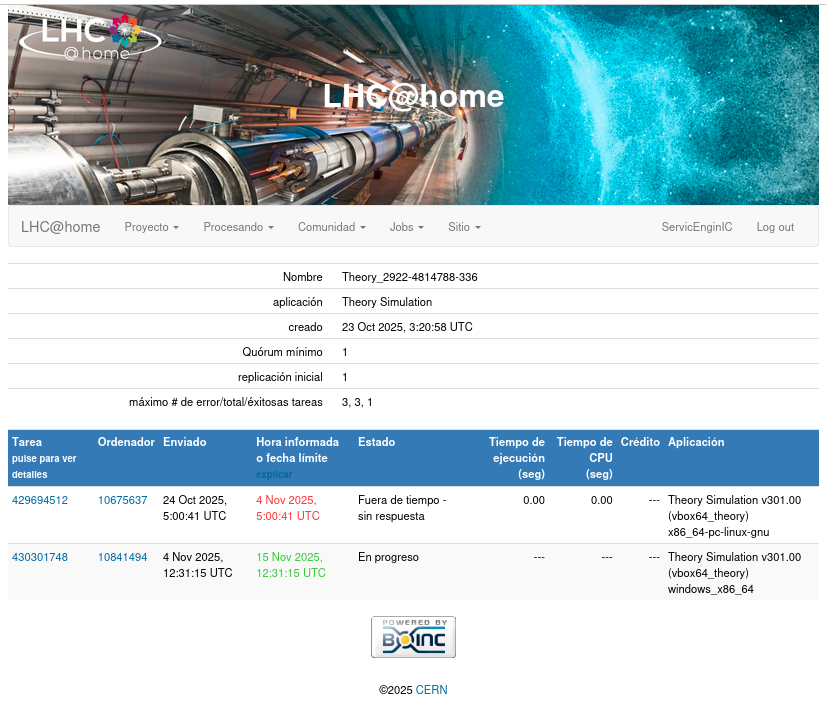
A similar situation: for example, task Theory_2922-4895579-343 has been running for over a week. Considering that the PC runs 6-8 hours a day, the calculation is still running, and the running.log is already over 3MB. The project is updated periodically, and today it says "Time expired - no response." It's a shame so much time was wasted. And about 40% of these extremely long tasks. Isn't it possible to increase the deadline? |
|
Send message Joined: 14 Jan 10 Posts: 1533 Credit: 10,042,485 RAC: 973 |
A similar situation: for example, task Theory_2922-4895579-343 has been running for over a week. Considering that the PC runs 6-8 hours a day, the calculation is still running... ATLAS, CMS and Theory's on your system are running within a Virtual Machine and are considered to run without any interruption, so no pausing and suspending. After a overnight suspend they will error out or for Theory's with a bit of luck will restart from the beginning. |
|
Send message Joined: 8 Jul 12 Posts: 7 Credit: 1,918,772 RAC: 1,185
|
After a overnight suspend they will error out or for Theory's with a bit of luck will restart from the beginning. Yes, the task is paused and continues correctly the next day, with no errors. This is evident in the running.log logs. But the 10-day limit is woefully inadequate for extremely long tasks. Is it possible to increase the limit if the task is running correctly and periodically announces itself to the server? Not 864,000 seconds, but 1M or more? |
|
Send message Joined: 15 Jun 08 Posts: 2724 Credit: 300,130,604 RAC: 46,418 |
Theory due dates set for BOINC are inter-coordinated with due dates in the backend systems. Changes on one end require changes on the other end and vice versa. Your computer's mc-plots record shows a Theory error rate of only 1 %. This is pretty low and does not justify those changes, especially since this 1 % covers all kind of errors. |
|
Send message Joined: 8 Jul 12 Posts: 7 Credit: 1,918,772 RAC: 1,185
|
I understand, thanks for the clarification. Task Theory_2922-4895579-343 is still running, even though the status is "Time expired - no response." Can I stop it? It won't do any good? running.log 2025-Oct-31 10:51:58 6.0M text/plain;charset=utf-8 A small part running.log https://dpaste.com/BE34838BN |
|
Send message Joined: 15 Jun 08 Posts: 2724 Credit: 300,130,604 RAC: 46,418 |
Whatever you do, I doubt you will get credit for this task. So, it might be the best to cancel it and run a fresh task. |
|
Send message Joined: 14 Jan 10 Posts: 1533 Credit: 10,042,485 RAC: 973 |
Did you take that from the runRivet.log from disk or from the running.log shown by using the "Show graphics" button from BOINC Manager? As computezrmle said, you probably will not get credit. The wingman that did the resend, returned a 'valid' result, however scientifical is was not valid: job: run exitcode=1 |
|
Send message Joined: 8 Jul 12 Posts: 7 Credit: 1,918,772 RAC: 1,185
|
Crystal Pellet From the running.log shown by using the "Show graphics" button from BOINC Manager. |
|
Send message Joined: 14 Jan 10 Posts: 1533 Credit: 10,042,485 RAC: 973 |
Crystal Pellet From the running.log shown by using the "Show graphics" button from BOINC Manager.That's OK. The runRivet.log from disk is not updated after the task was suspended (Leave in memory off), BOINC client restarted or system rebooted. Maybe you could find something in stderr.txt in the corresponding slot, why the task takes so long. BTW: the deadline for the client is 10 days, but from the server you get 11 days as deadline (1 day grace period). |
 Send message Joined: 28 May 16 Posts: 7 Credit: 6,244,877 RAC: 5,167  
|
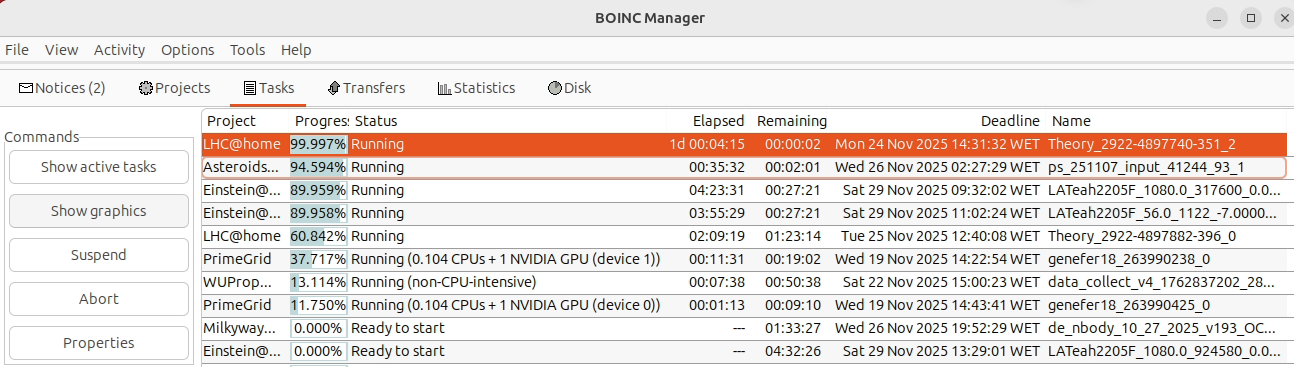
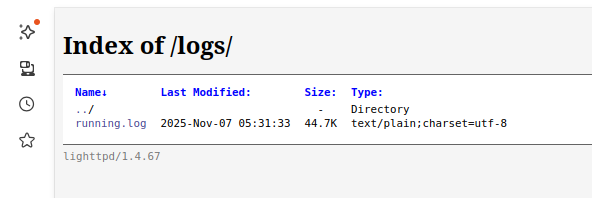
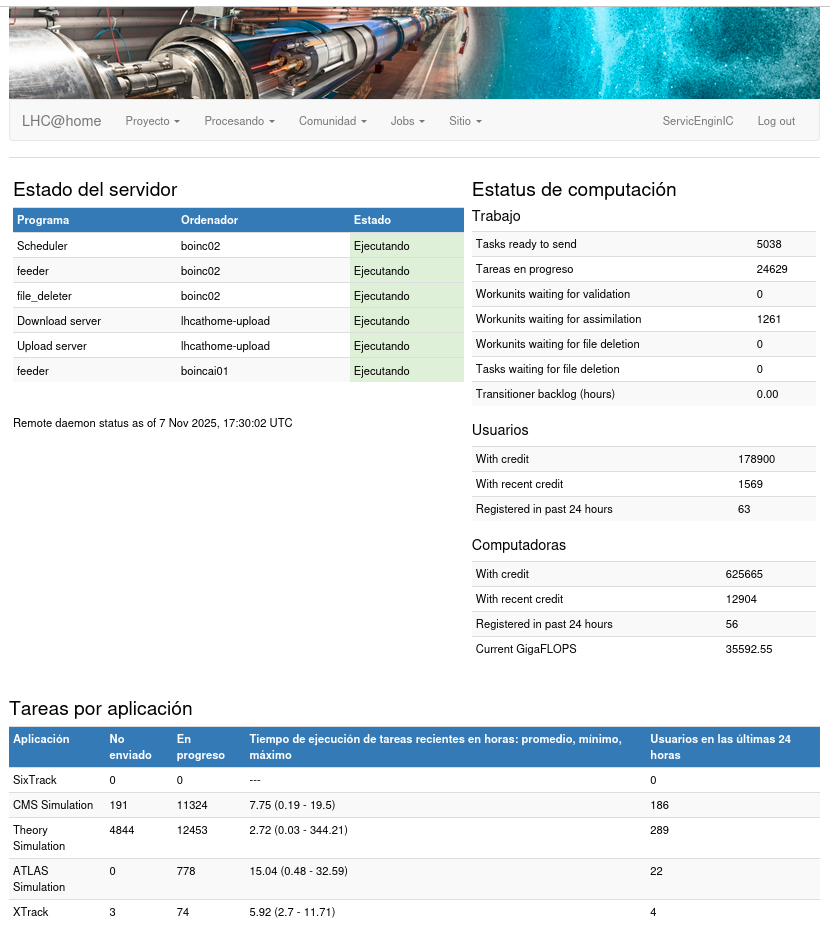
However, for Theory tasks, you can click on the "Graphics" button in the left hand part of the BOINC Manager, then a Browser window opens, there you click on "logs", and then on "running log" - this shows the progress of the task This tip has been very useful for me. Previously, I blindly aborted Theory tasks when lasting more than 5-6 days. Then I read your comment (thank you very much) and explored "Show graphics" command and beyond at BOINC Manager. When selecting a running Theory task, command "Show graphics" gets enabled. When pressing "Show graphics", an explorer window opens, containing a link to "logs". If that link is pressed, a very useful "Index of /logs/" page opens. That page contains a "Last Modified:" label that gives a clue on whether "running.log" file has been recently updated or not. When updating "running.log" file becomes frozen, it can be taken as a warning to abort the corresponding task. And if "running.log" is being periodically updated, it can be taken as a signal that the task is still alive. "Index of /logs/" page also contains a link to "running.log" file itself. At the beginning of "running.log" file, a definition of the task is shown. The penultimate parameter on the first line indicates the stated number of events for the task. 55000 in this example. And at the end of the file, progress of the task can be followed. Based on previous information, I continued to process this overdued task. I was following that "running.log" file" was being periodically updated, and the task was slow but continuously approaching its stated number of events (55000). Finally, that task was successfully reported, more than three days past its due date/time. It holds my current record: 1,239,153.57 seconds of execution time, 16,659.96 credits awarded. Task details It was also the longest task reported on November 7th: 344.21 hours That is: 14 days, 8 hours, 12 minutes, 33 seconds |
|
Send message Joined: 14 Jan 10 Posts: 1533 Credit: 10,042,485 RAC: 973 |
Congratulations for returning this overdue valid task and many thanks for your extended comments and images!However, for Theory tasks, you can click on the "Graphics" button in the left hand part of the BOINC Manager, then a Browser window opens, there you click on "logs", and then on "running log" - this shows the progress of the task It was also the longest task reported on November 7th: 344.21 hoursUnfortunately someone broke your record during the last 100 tasks: Theory Simulation 4930 6784 3.52 (0.03 - 489.41) 20 days - 9 hours - 25 minutes |






©2026 CERN